
MyEndeavor
Endeavor HealthMedical
4.1572.00 Reviews
- Version
- 11.8.3
- Installs
- 100.00K
- Age Rating
- Everyone
Screenshots
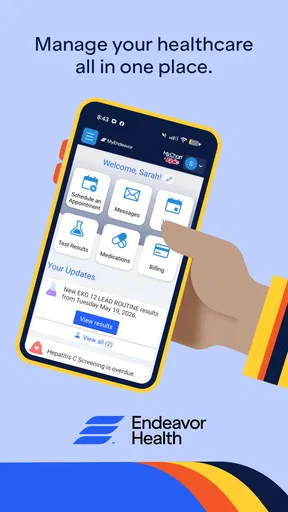
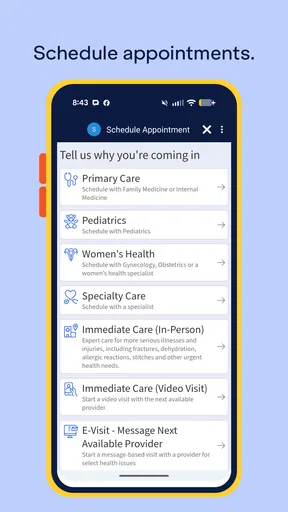
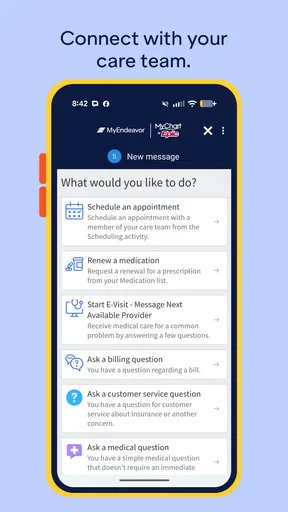
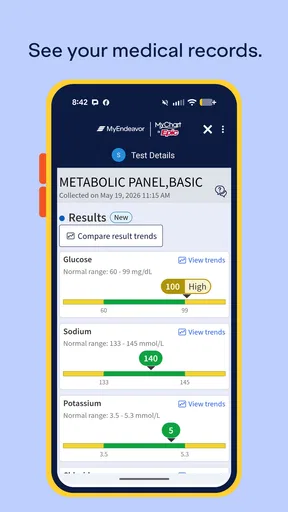
Our Review of MyEndeavor
 Analysis by Appyee
MyEndeavor is a medical app from Endeavor Health that I found most useful when I wanted a more direct way to stay connected with my healthcare experience on a phone. It is free, rated for Everyone, and has built a sizeable audience, with more than one hundred thousand installs and an average score of 4.3 from roughly four thousand ratings. Those figures suggest that it has become a familiar option for many people, although popularity alone does not make every medical app equally convenient for every situation.
My overall impression is that this is best understood as a companion to your care rather than a replacement for a conversation with a clinician. Its value depends heavily on how smoothly it can connect you with the information and services you already use through Endeavor Health. That makes the quality of your internet connection, your phone’s readiness, and your expectations especially important. If you need immediate emergency help, a general symptom search, or a fully independent health tracker, I would look elsewhere. If your healthcare is already tied to Endeavor Health, however, the app has a practical reason to be on your phone.
Where the connection matters most
I find that connection quality matters most when a quick check turns into a task that needs a clear confirmation. This section looks at how to distinguish a slow screen from an action that has actually completed, so the next step is based on what happened rather than guesswork. That distinction becomes especially useful when the phone’s signal changes during the day.
Useful when you are trying to reach your care
The most important part of using a healthcare app is not how attractive the interface looks; it is whether it helps at the moment you need to check something or move forward with care. With MyEndeavor, the experience is naturally connected to Endeavor Health’s digital services, so network access becomes part of the workflow. When the connection is stable, I can approach the app as a convenient front door to my healthcare relationship instead of searching through a browser, old messages, or paper reminders.
That convenience is particularly noticeable for short tasks. A person may open the app while sitting in a waiting room, checking details before leaving work, or trying to organize a question before a visit. These are not dramatic moments, but they are exactly where a dedicated medical app can reduce friction. I do not have to remember which webpage to open first, and I can keep the healthcare task separate from the distractions of a normal browser session.
There is also a useful difference between checking information and acting on it. A quick look may take only a moment, while anything that involves signing in, loading a healthcare page, or sending information can depend more noticeably on the network. I would therefore avoid opening the app for the first time just as I am rushing into an appointment. Setting it up calmly at home gives me a better chance to understand the sign-in process and recognize whether the app is ready for regular use.
A realistic day-to-day example
Imagine that I am leaving work and remember that I need to review something connected with an upcoming appointment. I open MyEndeavor from my phone rather than trying to locate the correct healthcare webpage in a search engine. If the mobile signal is good, I can handle the task while commuting or waiting for a pickup. If the connection is weak, I would not keep tapping the same control and assume that nothing happened. I would first wait, check the connection, and then confirm the result before trying again.
That last step matters more in medical situations than in ordinary shopping or entertainment apps. Repeated taps can create uncertainty: did the request fail, is the page still loading, or did the action go through but the confirmation take time? My practical habit is to pause after an action, look for a visible change, and avoid submitting the same request repeatedly. This is a small workflow improvement, but it prevents confusion when the network is slow.
When the usual alternative may be better
A browser can sometimes be the better option. If I am using a shared device, if the app needs attention after an update, or if I only need to reach a general Endeavor Health webpage, opening the website may be quicker than troubleshooting the app. A phone call is also more appropriate when the issue is urgent, complicated, or too personal to manage through a digital screen.
I would not use MyEndeavor as an emergency channel. A healthcare app can be helpful for routine organization, but a serious or rapidly worsening medical problem calls for immediate professional assistance through the appropriate emergency service. The app’s medical category should not be mistaken for real-time emergency care.
How it fits different mobile situations
MyEndeavor’s usefulness can shift with the setting: a calm setup at home is different from a hurried check in a clinic or a session on the move. I’ll consider which situations suit a phone best and where a larger screen, prepared details, or a direct conversation may be more practical. The next section turns to what I would do when access is interrupted.
At home, in transit, and inside a clinic
The app makes the most sense on a personal phone because that is where many healthcare tasks naturally happen. At home, I can take a few minutes to sign in, review the layout, and make sure I know where to go before I need the app. In transit, the benefit is convenience, but the risk is inconsistency: tunnels, crowded networks, and moving between Wi-Fi and cellular service can interrupt a session.
Inside a clinic, I would treat the phone as a support tool rather than my only source of information. A charged battery, a readable screen, and a reliable connection all affect how comfortable the experience feels. If I need to show something to staff, I would prepare it before reaching the desk instead of assuming that the app will load instantly in a crowded building.
One less obvious tip is to avoid making a healthcare task depend on a last-minute password search. I keep the sign-in details available through my phone’s secure password manager, rather than writing them in an exposed note. This is not a special feature of MyEndeavor; it is a sensible way to reduce delays while protecting account access. Medical apps deserve the same care I would give to banking or identity-related services.
Small screens change how I use it
A phone is convenient, but it is not always the best screen for careful reading. I prefer to use MyEndeavor for focused actions and brief checks, then move to a larger screen or a direct conversation when I need to compare several pieces of information. On a small display, it is easy to skim a date, name, or instruction too quickly.
I also avoid using the app while walking, driving, or doing anything that divides my attention. Medical information deserves a deliberate look. If I am in a noisy place, I wait until I can concentrate, because the inconvenience of postponing a routine check is smaller than the risk of misunderstanding what I see.
Who benefits most from the mobile format
I think the strongest audience is someone who already receives care through Endeavor Health and wants a single mobile starting point for routine digital interactions. It may also suit family members who help organize appointments or healthcare information, provided account access is handled properly and the patient’s privacy is respected.
It is less compelling for someone whose providers are spread across unrelated systems. In that situation, a general health organizer or the separate apps used by each provider may fit the person’s routine better. MyEndeavor is tied to a particular healthcare environment, so its usefulness grows when that environment is already central to your care.
What happens when the app or network fails
A stalled app can leave me unsure whether the problem is the device, the network, or the service I am trying to reach. Here I focus on sensible recovery steps and on recognizing when further troubleshooting is no longer the right use of time. That leads naturally to a few habits for making routine visits to the app more deliberate.
Do not confuse a loading problem with a medical result
Connectivity problems are frustrating in any app, but they require extra care here. A blank page, delayed response, or interrupted sign-in does not automatically mean that a healthcare request was rejected. I would close the loop carefully: wait for the page to respond, check whether a confirmation appeared, and only then decide whether to try again.
If the app stops responding, my recovery sequence is simple. I check whether other websites or apps can connect, switch between Wi-Fi and cellular service when appropriate, and reopen MyEndeavor. If that does not help, I restart the phone before assuming the account or healthcare system is at fault. I also make sure the app is current; the version listed for MyEndeavor is 11.8.3, and keeping software updated is a sensible first step when a mobile service behaves unexpectedly.
Recovery should not mean repeatedly entering sensitive information on an unfamiliar screen. If a sign-in page looks unusual or a message asks for information that does not fit the task, I stop and verify that I am using the official app. Convenience is never a good reason to lower caution around medical accounts.
Plan before a weak-signal appointment
A useful preparation habit is to open the app before leaving home, while the connection is dependable. I check the information I expect to need, note anything important in an appropriate private place, and make sure the phone has enough battery. This does not mean assuming that every part of the app works without a connection; it simply avoids making an important moment depend on a signal that may disappear.
I would also keep the clinic’s contact information and appointment details available through reliable, legitimate channels. If the app cannot connect, I want a backup way to ask a routine question or confirm where I should go. The backup is especially valuable when I am already late, traveling through an unfamiliar area, or dealing with a family member’s appointment.
When to stop troubleshooting
There is a point where trying to repair an app becomes less useful than contacting the healthcare provider directly. If the matter is time-sensitive, if repeated attempts create uncertainty, or if I need an answer that requires clinical judgment, I stop experimenting with the phone. MyEndeavor can support communication, but it should not become a barrier between me and a human professional.
This is one of the clearest trade-offs of a connected medical app: it can make ordinary access easier while adding a technical dependency. People who are comfortable with mobile troubleshooting may barely notice that dependency. Someone with limited connectivity, an older phone, or little patience for account recovery may find a phone call more dependable.
Using it without wasting connection or attention
I get more value from a medical app when I open it with a clear purpose instead of checking it reflexively. This section considers how to keep sessions focused, protect privacy in everyday settings, and avoid making important tasks depend on a rushed moment. Those habits shape the broader judgment of when the app is genuinely helpful.
Choose the right moment for larger tasks
I prefer to handle anything that may involve several screens when I have stable Wi-Fi or a strong mobile signal. That reduces the chance of an interrupted session and makes it easier to read carefully. I do not open the app repeatedly just to see whether something has changed; I use it when I have a specific purpose, then close it when I am done.
That approach is useful for both data-conscious users and people who simply want less screen clutter. A medical app is not entertainment, so constant checking rarely improves the experience. Focused visits to the app are more practical than treating it as a feed that needs frequent refreshing.
Protect privacy on shared connections and phones
Public Wi-Fi can be convenient, but I am more comfortable handling sensitive healthcare information on a trusted network or my own cellular connection. I also avoid leaving the app open on a shared phone and use the device’s screen lock. These habits are especially important if a family member borrows the device or if I use a tablet that other people can access.
Notifications deserve attention as well. Even without discussing any particular notification behavior, I would review what appears on the lock screen and decide whether that level of visibility suits me. A private medical reminder can become public in a waiting room or on a desk. The best setup is not necessarily the one with the most alerts; it is the one that helps me notice important information without exposing more than I intend.
Make the app part of a broader routine
MyEndeavor works better as one piece of a healthcare routine than as the only place where I keep track of everything. I use a calendar for appointments, a secure note for questions I want to raise, and the app for the digital tasks it is designed to support. Separating those jobs helps me avoid opening the app without knowing what I need.
A particularly useful habit is preparing questions before a visit. I write them in plain language, then use the app when I need to reach the relevant part of my care experience. This turns a quick mobile session into something more purposeful. It also prevents me from relying on memory when I am tired or distracted.
My final connectivity verdict
After looking at how it fits into real mobile use, I see MyEndeavor as a practical choice for people already connected to Endeavor Health. It is free, available to an Everyone-rated audience, and maintained by Endeavor Health, with a release history that began on December 31, 2015. Its current Android requirement is version 11 or newer, so compatibility is something I would check before installing it on an older device.
The app’s strongest quality is not that it eliminates every healthcare inconvenience. Rather, it gives Endeavor Health users a focused place to begin routine digital interactions. When the network is reliable and the phone is prepared, that can save time compared with hunting through a browser or keeping every detail in scattered messages. The audience response is encouraging too: it has around four thousand ratings, more than five hundred written reviews, and an average of 4.3, which points to generally positive reception without guaranteeing a perfect experience for everyone.
My recommendation comes with a clear condition: use it for convenience, not as your only safety net. Keep a direct route to professional help, avoid relying on a weak connection for urgent matters, and confirm important actions instead of tapping through uncertainty. People who want a provider-specific healthcare companion will likely get the most from it. People seeking a universal medical tracker, emergency service, or completely offline experience should choose a different tool or contact method.
MyEndeavor is worth trying when Endeavor Health is already part of your care and you want a mobile starting point that fits ordinary life. I would install it, set it up over a dependable connection, learn where the functions I use most are located, and then treat it as a helpful bridge to care rather than a substitute for the care itself.
Privacy and Permissions
See what permissions an app requests and how it handles your data.
- Location
- approximate location (network-based), precise location (GPS and network-based)
- Phone
- directly call phone numbers
- Photos/Media/Files
- read the contents of your USB storage, modify or delete the contents of your USB storage
- Storage
- read the contents of your USB storage, modify or delete the contents of your USB storage
- Camera
- take pictures and videos
- Microphone
- record audio
- Other
- view network connections, pair with Bluetooth devices, access Bluetooth settings, full network access, change your audio settings, run at startup, reorder running apps, control vibration, prevent device from sleeping, Google Play license check
Verdict
Strengths of MyEndeavor
- Simple way to track personal goals, habits, and daily progress.
- Clean interface makes key tasks easy to find and update.
- Progress records can encourage consistency and long-term motivation.
- Useful for organizing several areas of personal development in one place.
- Suitable for users who prefer self-guided improvement tools.
Limitations of MyEndeavor
- Some features may require an account or personal data to be shared.
- Goal tracking can feel repetitive without varied reminders or challenges.
- Limited value for users seeking professional coaching or expert guidance.
- Progress depends heavily on regular manual updates from the user.
- The app may feel too basic for users wanting detailed analytics or planning tools.
Similar Picks in This Category
View All
WebMD: Symptom Checker
WebMD, LLC4.1

Microphone Amplifier
DOSA Apps4.2

Anatomy Learning - 3D Anatomy
3D Medical OU4.5

Period Tracker and Calendar
SimpleInnovation4.9

GoodRx: Prescription Coupons
GoodRx4.8

CVS Health
CVS Pharmacy4.5
Frequently Asked Questions
What is MyEndeavor and what can I use it for?
MyEndeavor is an app designed to help users organize, follow, and manage personal goals or ongoing endeavors in one convenient place. Depending on the version and account setup, it may let you review progress, access relevant information, receive updates, and keep track of activities. Before downloading, check the current store description because available tools can vary by region, platform, or organization providing access.
Is MyEndeavor free to download and use?
MyEndeavor may be available as a free download, but that does not always mean every feature is free. Some services can require an account, an invitation, a subscription, or access provided by a participating organization. I recommend checking the Google Play or App Store listing for pricing details, in-app purchases, and subscription conditions before installing, especially if you plan to use premium functionality or continued access to stored information.
Do I need to create an account to use MyEndeavor?
An account may be necessary for MyEndeavor if the app stores progress, synchronizes information, or connects you with a specific program, workplace, school, or service provider. Registration requirements can differ depending on how the application is distributed. You may need to provide an email address or other identifying information, so review the privacy policy and sign-up screen carefully before submitting personal details.
What devices and permissions does MyEndeavor support?
MyEndeavor is intended for supported Android and iOS devices, although compatibility depends on the operating-system version and the developer’s current release. During installation or first use, the app may request permissions such as notifications, internet access, or storage-related access. These permissions should be reviewed rather than accepted automatically. If your phone uses an older system, confirm compatibility in the official store listing.
Is MyEndeavor safe and suitable for my personal information?
MyEndeavor should be downloaded only from the official Google Play Store or Apple App Store to reduce the risk of counterfeit versions. Because the app may handle account details, progress data, communications, or other sensitive information, read its privacy policy and developer information before using it. Use a strong, unique password, install updates promptly, and avoid entering confidential data unless the app’s purpose clearly requires it.
